To sell eligible Banana Ball tickets, sign in to the official Fans First Tickets account, open Manage Tickets and Transfers, select only the tickets you cannot use, review and confirm the Marketplace listing, and connect the requested bank account through Stripe for payout. A first-party Banana Ball Marketplace campaign documented that sequence and described its listings as face value, with zero markups and zero fees. However, not every ticket or event is guaranteed to have a Sell option. Eligibility, ticket assignment and Marketplace configuration can vary. If the button is missing, keep the ticket inside your account, document the problem and contact official support. Do not create a duplicate social-media sale, accept off-platform payment, or send a barcode screenshot while the ticket remains in your possession.
Before listing, check ticket eligibility and account details
A ticket must first appear in the correct Fans First Tickets account. Search your purchase or transfer email, verify the account address, and open the exact event. Then check the teams, date, venue, quantity and current ticket status against the Banana Ball schedule. A fan who bought ?Banana Ball? may have a game between two BBCL teams other than the Savannah Bananas, so the matchup matters in the listing.
Look for an available Sell or Marketplace action on the tickets you own. The app officially advertises Marketplace listing, but a first-party campaign for K Club holders also said that eligibility in its test was event-specific and did not guarantee the same ability at future events. That means you should not promise a buyer that a ticket can be sold until the official account actually offers the listing flow.
Before proceeding, confirm:
- The app is the Banana Ball Fans First Tickets product.
- The tickets are visible in your account and are not pending transfer.
- You selected the correct event and quantity.
- The listing screen displays the price and current Marketplace terms.
- You can complete payout identity and bank setup through the official Stripe redirect.
Never give another person your account password, email code or banking login to ?help? list the tickets. Payout onboarding may ask you to connect or verify information inside an official flow; it does not require sharing credentials with a buyer.
How to list Banana Ball tickets on Fans First
The public first-party instructions give a five-step seller path. App labels can change with updates, but the checkpoints remain useful.
1. Open Manage Tickets and Transfers
Sign in with the email that holds the tickets. Open the management area and choose the event. If several dates appear, stop and verify the city, both teams and game date. Do not start from a message sent by an unknown buyer; start inside your own account.
2. Select only the tickets you want to sell
Choose the exact quantity. If you plan to attend with part of the group, leave those tickets unselected. Pay attention to seats that must stay together, general-admission descriptions and any premium product. The confirmation screen is your opportunity to catch an accidental full-order listing.
3. Review and confirm the listing
Review the event, ticket count and displayed face-value terms. The documented Banana Ball Marketplace is designed to return tickets to real fans rather than create a markup. Do not assume you can type an arbitrary profit price. Read the live screen because terms can be updated after an earlier campaign.
4. Connect payout through Stripe
The first-party workflow redirects sellers to Stripe to connect a bank account. Inspect the hostname and complete the required verification directly. If the flow suddenly requests payment to release a payout, gift cards, cryptocurrency or a password sent by chat, stop. Save the official listing confirmation and any Stripe onboarding record.
5. Monitor the listing in your account
After confirmation, the tickets can appear for other account holders to browse and buy. Return to Fans First to see whether the listing is active, partially sold, completed or no longer available. Do not use the ticket at the gate or transfer it privately while it is actively offered for sale.
What do face value, zero markup and zero fees mean?
In a documented Banana Ball Marketplace campaign, the organization described verified holders selling to other fans at face value with zero markups and zero fees. That is different from a conventional open resale marketplace where a seller chooses a high asking price and both sides may pay service charges.
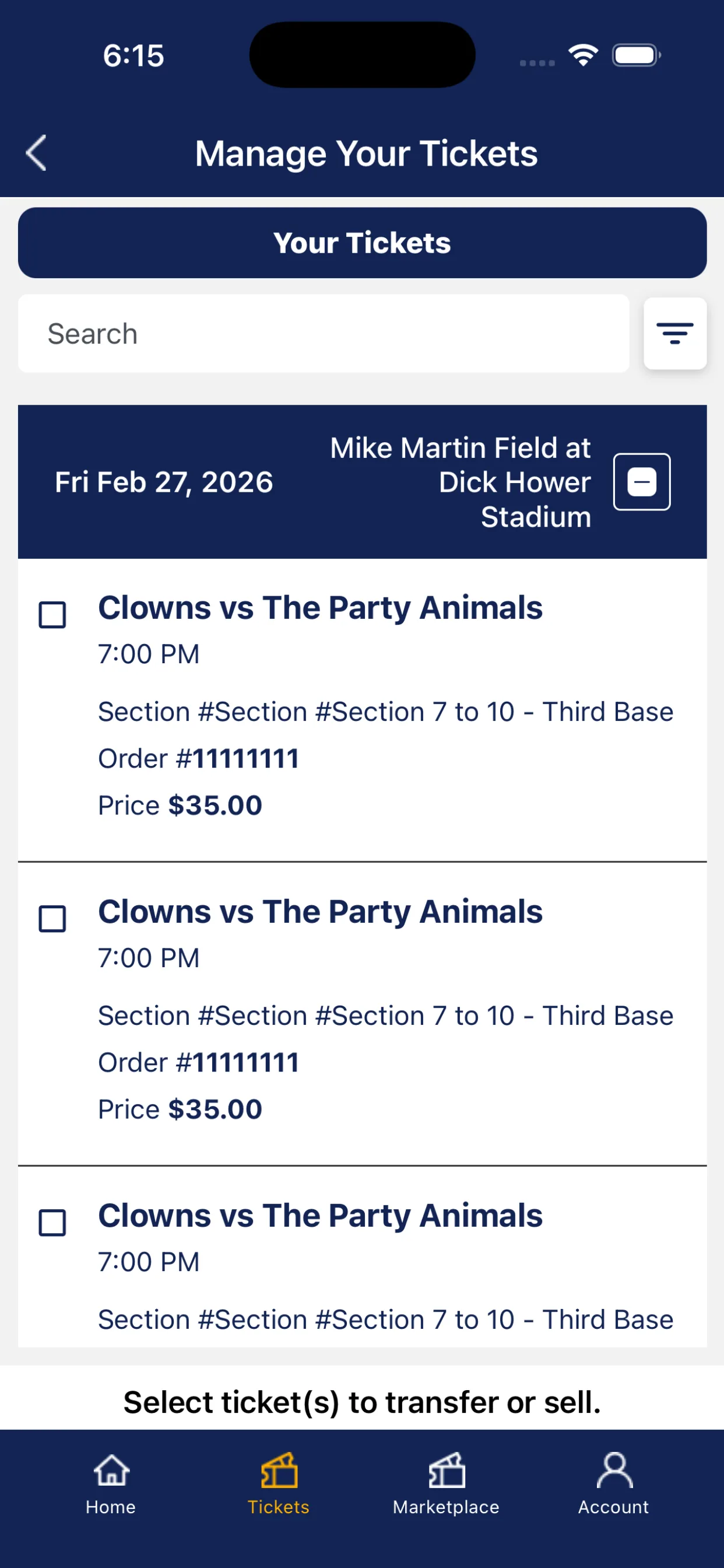
Face value does not mean that every ticket is $35. Official 2026 ticket guidance said direct tickets started at $35 and could reach $125 for premium experiences. A premium ticket's original value can therefore differ from a standard ticket. The Marketplace screen should show the amount tied to the product being listed.
?Zero fees? in a campaign also should not be expanded into promises about every financial or tax consequence. Review the current seller confirmation and Stripe terms. Depending on law and payment history, a seller may have identity or tax reporting obligations that are separate from a marketplace service fee. This guide cannot determine an individual seller's tax treatment.
Understand partial sales and odd quantities
Do not assume every buyer must take the entire block. A first-party test gave a useful example: K Club members could hold six tickets to an event, while other fans in that campaign were limited to five ticket purchases in a calendar year. If a member listed all six, a buyer could take five and leave one unsold.
That exact six-versus-five rule was part of a specific communication, not a universal promise for every 2026 account. The practical lesson applies broadly: check whether the listing allows quantities to split, and monitor what remains.
- If you need to sell all tickets together, confirm whether the interface offers that condition.
- If a partial sale occurs, recheck which seats remain in your account.
- If your travel plan depends on the whole group selling, do not book nonrefundable alternatives until status is clear.
- If only one ticket remains, keep the listing active only if you are certain you will not use it.
Use the live account status as the record. A notification email can be delayed, filtered or misunderstood. Never tell a second buyer that a ticket is available until you verify it did not already sell.
Why might the Sell button be missing?
There is no reliable public rule that says the Sell button opens a fixed number of days before every Banana Ball game. Fans have reported different timing and eligibility, but forum reports are experiences, not organization policy. The official evidence supports only that the function exists and can be limited by event or ticket type.
Check these possibilities in order:
- Wrong account: the purchase lives under another email.
- Transfer state: a ticket is pending, accepted elsewhere or no longer controlled by this account.
- Event eligibility: the official Marketplace may not support that ticket or event at that moment.
- Ticket details: seat assignment or product configuration may not be complete.
- App version: update from the official store and sign in again.
- Temporary service issue: record the error and retry the official app rather than moving to an unofficial seller.
If those checks do not resolve it, contact the Banana Ball ticket team with the event, order number, account email, app version and a screenshot with barcode and payment details hidden. Ask whether the ticket is eligible and what current option applies. Do not advertise a private sale while waiting for an answer.
Should you transfer, sell or keep the ticket?
| Action | Use it when | Main check |
|---|---|---|
| Transfer | A known friend or family member will use the ticket | Correct recipient email and accepted status |
| Sell on Marketplace | You cannot attend and the account marks the ticket eligible | Listing quantity, terms and payout setup |
| Keep | You still plan to attend | No active sale or pending transfer |
A transfer is not a marketplace sale. It moves access to a known recipient but does not automatically collect money. If a stranger says they will pay after transfer, you have left the protected selling flow. Conversely, listing a ticket and then separately transferring it can create a conflict. Use one official action and confirm its completion.
If you decide to keep the ticket, remove any active listing through the account before traveling and verify that the live ticket is available. The current app status, not your memory of an earlier click, determines whether you still control it.
What happens after a ticket sells?
Return to the account and inspect the sold and remaining tickets. The app description says ticket information updates in real time, but you should still verify the final state. Save the sale confirmation, payout connection record and any transaction reference until the payment is complete.
No public first-party source reviewed for this guide provides one guaranteed payout timetable for every event and seller. Use the timing displayed in the current confirmation or Stripe account. Bank processing, verification and event-related conditions can affect when funds arrive. If the displayed date passes, contact official support with the listing and transaction references; do not pay a ?recovery? service.
If only part of the order sold, decide what to do with the rest. Keep them listed, remove them, transfer to companions or attend?but do not make two conflicting promises. Recheck the game status and the relevant venue information if you will use remaining tickets.
Avoid ticket-selling scams
Official Banana Ball guidance warns that social-media ticket offers are frequently scams. Sellers can be targeted too. A scammer may request a barcode ?to verify it,? send a fake payment email, overpay and demand a refund, or ask for a one-time login code.
- Keep the listing, buyer transaction and payout inside the official flows.
- Never send a barcode screenshot as proof.
- Never share a password or verification code.
- Do not accept an overpayment and return the difference.
- Do not click a payout link sent by the buyer.
- Check your real account rather than trusting a payment screenshot.
- Remove an active listing before transferring or using a ticket.
When a private buyer insists that Fans First is ?not working,? that is a reason to pause, not a reason to surrender protections. The official support team can confirm eligibility; a stranger cannot.
Selling Banana Ball tickets FAQ
Can every Banana Ball ticket be sold on Fans First?
No guarantee applies to every ticket or event. Use the Sell option only when it appears for your eligible ticket, and contact official support if eligibility is unclear.
Can I add a markup?
The documented official Banana Ball Marketplace was built around face-value listings with zero markups. Follow the current screen; do not use it as a profit-pricing tool.
When will I get paid?
Complete the official Stripe payout setup and use the timing shown in the transaction terms. No single public timetable was confirmed for all sellers. Keep records and contact official support if the displayed timing passes.
Can I remove a listing?
Use the current account management controls if removal is offered. Confirm that the listing is inactive and that the ticket is back under your control before attending or transferring it.
What if only some tickets sell?
Check which exact tickets remain. Decide whether to continue listing, remove, transfer or use them. Do not assume the order was sold as one block.
Can I transfer instead of selling?
Yes, the app advertises transfers to friends and family. Transfer is best for a known recipient; it is not a substitute for a protected seller transaction with a stranger.
Comments
Comments are reviewed before publication. Spam, personal information and abusive content are not published.
Loading comments…